


If you’ve searched for information on a domain name (for example with one of the services referred to in my previous article on searching for ‘social’ information associated with a domain name), you will perhaps have come across the mystifying message: “clientHold”.
What does “clientHold” mean? And what are the practical consequences of this domain name status code and of the others we sometimes see when using domain name search services (as in the example below with ICANN’s RDAP, but also with classic services such as Whois)?
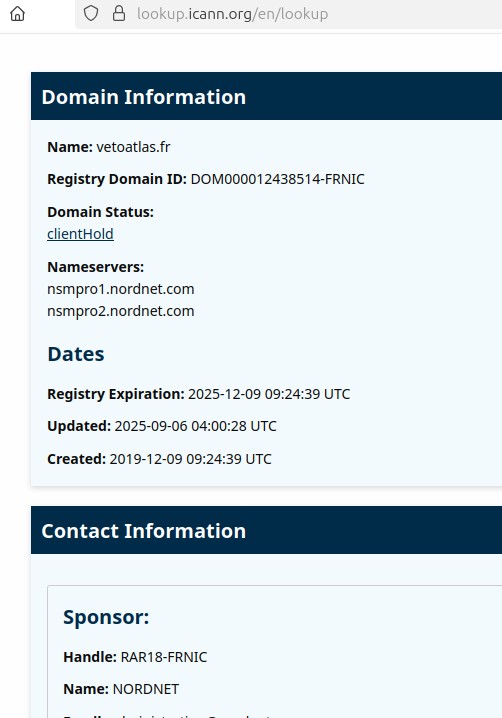
This image is a screenshot of the search response of a RDAP client with detailed information on an Internet domain called “vetoatlas.fr”.
Below is a complete description of its content:
Domain Information
- Name: vetoatlas.fr
- Registry Domain ID: DOM000012438514-FRNIC
- Domain Status: clientHold
Name servers
- Nameservers:
- nsmpro1.nordnet.com
- nsmpro2.nordnet.com
Dates
- Registry Expiration: 2025-12-09 09:24:39 UTC
- Updated: 2025-09-06 04:00:28 UTC
- Created: 2019-12-09 09:24:39 UTC
Contact Information
- Sponsor:
- Handle: RAR18-FRNIC
- Name: NORDNET
Here, “clientHold” means that the registry’s client, the registrar, has asked that this domain no longer be published in the DNS1, for example due to a commercial dispute with its client, the domain name holder. Note that this particular RDAP client also provides a hypertext link to documentation (https://www.icann.org/resources/pages/epp-status-codes-2014-06-16-en#clientHold).
Careful with the word “client”
Throughout this article, I make frequent use of the word “client”. It’s important to bear in mind that this use is relative.
- For the registry, the client is the registrar.
- For the registrar, the client is the domain name holder. In general, the domain name holder cannot set the domain name status codes, or at least only some of them, and even then only indirectly.
- When I refer to an “RDAP client” or “Whois client”, I mean an IT client, in other words a software application or a program that sends queries to a server and receives responses.
Where can I find a list of all the possible status codes?
Be careful! It all depends on the registry, and on how the information is presented to the user.
Let’s take the most common case, which uses the status codes standardised in RFC 5731, section 2.3. This list of status codes was standardised under the EPP, which is currently by far the most used protocol by registrars and registries. In the remainder of this article, a Whois or RDAP client is used to consult the status codes.
You will see right away that most status codes start with “client” or “server”. Remember that these terms relate to the relationship between the registrar (the client) and the registry (the server). The “clientHold” status referred to above meant that it was the client (that is the registrar, not the domain name holder) that had requested that the name be removed from publication. A “serverHold” status (yes, there is such a thing) would mean that the registry has removed the domain from publication.
Let’s now look at all the possible status codes in order, as per the RFC (although the RFC list is not necessarily exhaustive).
Status codes
DeleteProhibited
(May be prefixed by “client” or “server”.)
This status code prevents your domain from being deleted (or at least until its status is changed). You will see this, for example, when the domain is locked by the registry, at the holder’s request, in order to avoid hijacking2. Here is a domain locked by the .FR Lock3 service, returned by Whois:
domain:                        google.fr
status:                        ACTIVE
eppstatus:                     serverUpdateProhibited
eppstatus:                     serverTransferProhibited
eppstatus:                     serverDeleteProhibited
eppstatus:                     serverRecoverProhibited
hold:                          NO
registrar:                     MARKMONITOR Inc.
Expiry Date:                   2025-12-30T17:16:48Z
created:                       2000-07-26T22:00:00Z
last-update:                   2024-12-03T11:13:05.110779Z
Hold
(May be prefixed by “client” or “server”.)
This status code indicates a name not published in the DNS. When requested by the client, this status often derives from a dispute with the holder, for example over unpaid invoices4. When requested by the server, it may be the result of a dispute resolution procedure.
domain:                        vetoatlas.fr
status:                        ACTIVE
eppstatus:                     clientHold
hold:                          YES
holder-c:                      ANO00-FRNIC
admin-c:                       ANO00-FRNIC
tech-c:                        LRIO166-FRNIC
registrar:                     NORDNET
Expiry Date:                   2025-12-09T09:24:39Z
created:                       2019-12-09T09:24:39Z
last-update:                   2025-09-06T04:00:28.536397Z
RenewProhibited, TransferProhibited, UpdateProhibited
(May be prefixed by “client” or “server”.)
These status codes correspond to a restriction on three operations: renewal, transfer (to another registrar) and update (e.g. changing the list of name servers or amending the contacts or… status5). The latter two operations are often used in hijacking attempts. Accordingly, many registrars allow transfers to be restricted. The use of this option entails the application of the TransferProhibited status, as in this example returned by Whois:<:p>
domain:   internautique.fr
status:                        ACTIVE
eppstatus:                     clientTransferProhibited
Inactive
This status (which is not prefixed by “client” or “server” since it is not the result of an explicit request) indicates that the domain is not published in the DNS for a purely technical reason: no authoritative DNS server is indicated.
This case is found typically when an organisation reserves a name to avoid it being registered by another party, but does not use it. Here’s an example:
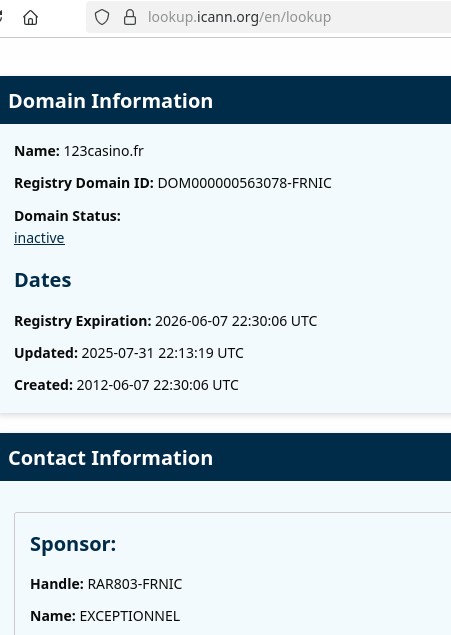
This image is a screenshot of a response from a RDAP client with detailed information on an Internet domain.
Below is a complete description of its content:
Domain Information
- Name: 123casino.fr
- Registry Domain ID: DOM000000563078-FRNIC
- Domain Status: inactive
Dates
- Registry Expiration: 2026-06-07 22:30:06 UTC
- Updated: 2025-07-31 22:13:19 UTC
- Created: 2012-06-07 22:30:06 UTC
Contact Information
- Sponsor:
- Handle: RAR803-FRNIC
- Name: EXCEPTIONNEL
As a result of this absence of name servers, the authoritative servers for the parent domain, in this case .fr, will return the error code NXDOMAIN = Non-Existent Domain, which is true as far as the DNS is concerned but not for the registry’s database:
% dig @d.nic.fr 123casino.fr
…
;; ->>HEADER<<- opcode: QUERY, status: NXDOMAIN, id: 19002
;; flags: qr aa rd; QUERY: 1, ANSWER: 0, AUTHORITY: 8, ADDITIONAL: 1
…
OK
This status simply indicates that all is well. It excludes all other statuses.
pendingCreate, pendingDelete, pendingRenew, pendingTransfer, pendingUpdate
These status codes indicate that an operation is being processed.
There’s status and status
The status codes outlined above are those standardised in RFC 5731, sometimes also referred to as “EPP status codes”. But this list is not exhaustive. Other technical standards may add additional statuses6. Furthermore, registries may add specific statuses, which they document in their technical guides for registrars. See for example Afnic’s “Procedure Guide”, with statuses such as serverTradeProhibited7.
Various registries can also post other statuses, independently of those contained in the EPP protocol. For example, the Whois server for the .fr TLD posts “eppstatus” codes as I’ve described but with an extra “status” giving information about the actions carried out by the registry, such as “Frozen”, meaning the domain cannot be modified, and “Blocked” meaning it is no longer published in the DNS (the equivalent of serverHold):
domain:                        comtedeparis.fr
status:                        BLOCKED
eppstatus:                     serverRenewProhibited
eppstatus:                     serverUpdateProhibited
eppstatus:                     serverTransferProhibited
eppstatus:                     serverDeleteProhibited
eppstatus:                     serverRecoverProhibited
eppstatus:                     serverHold
hold:                          YES
The web interface on Afnic’s website does not show the “eppstatus”:
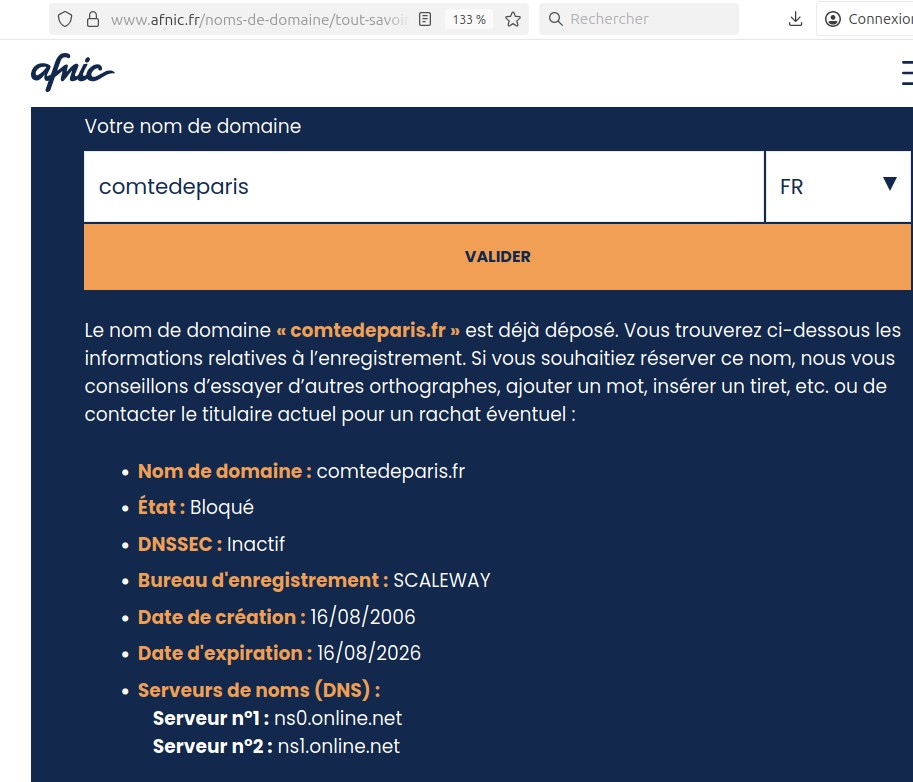
This image is a screenshot of the Whois interface on the Afnic (Association Française pour le Nommage Internet en Coopération) website.
Below is a detailed description of its content:
User interface
- There is an input field for entering the desired domain name.
- Pressing the “SUBMIT” button checks the availability of the domain name.
The input field already contains “comtedeparis” with the “.fr” TLD selected.
Message returned
- The domain name “comtedeparis.fr” has already been registered. Information relating to the registration is given below. If you wished to reserve this name, we advise you to try other spellings, add a word, insert a hyphen, etc. or to contact the current holder to see if it might be for sale:
Domain Information
- Domain name: comtedeparis.fr
- TLD: .fr
- Status: BLOCKED
- DNSSEC: Inactive
- Registrar: SCALEWAY
- Creation date: 08/16/2006
- Expiration date: 08/16/2026
Name servers (DNS)
- Server n°1: ns0.online.net
- Server n°2: nsl.online.net
Conclusion
Status codes provide important information on the situation of a domain name.
So be sure to pay close attention to them when searching for information on a domain name, for example following an outage or an abusive incident.
1 So it is perfectly possible to have a domain name registered but not activated in the DNS. Domain name management and the DNS are two different things, which is why it is not a good idea to use the DNS to check whether a name is available. We will shortly look at two other statuses preventing the publication of a domain even though it is registered.
2 So, ClientUpdateProhibited is a special case since it allows one operation, the removal of this status, in order to allow all subsequent changes.
3 This term refers to an attack in which the attacker, taking advantage, for example, of a weak password or a security flaw in an application, can modify a domain name, giving them complete control of the online services associated with the domain name.
4 Service typically used for the most critical domain names.
5 In many cases this is the “last warning” before deletion of a name, which is all the more serious in that the name can be re-registered (by another party) at the end of the 30-day redemption period.
On the same topic
Featured
News
07/20/26
Afnic named registry for eight French overseas TLDs
Afnic, the association responsible for .fr and several French ...
Expert papers

How can the DNS help identify drones remotely?
As part of the Télécom SudParis Cassiopée programme, Afnic ...
Agenda

09/10/2026